Clean up your Gmail inbox — in minutes
Trash hundreds of emails at once, unsubscribe from newsletters, and free up Google storage.
We only read email metadata (sender, date, size, labels and read status) — never subject lines or your email content.
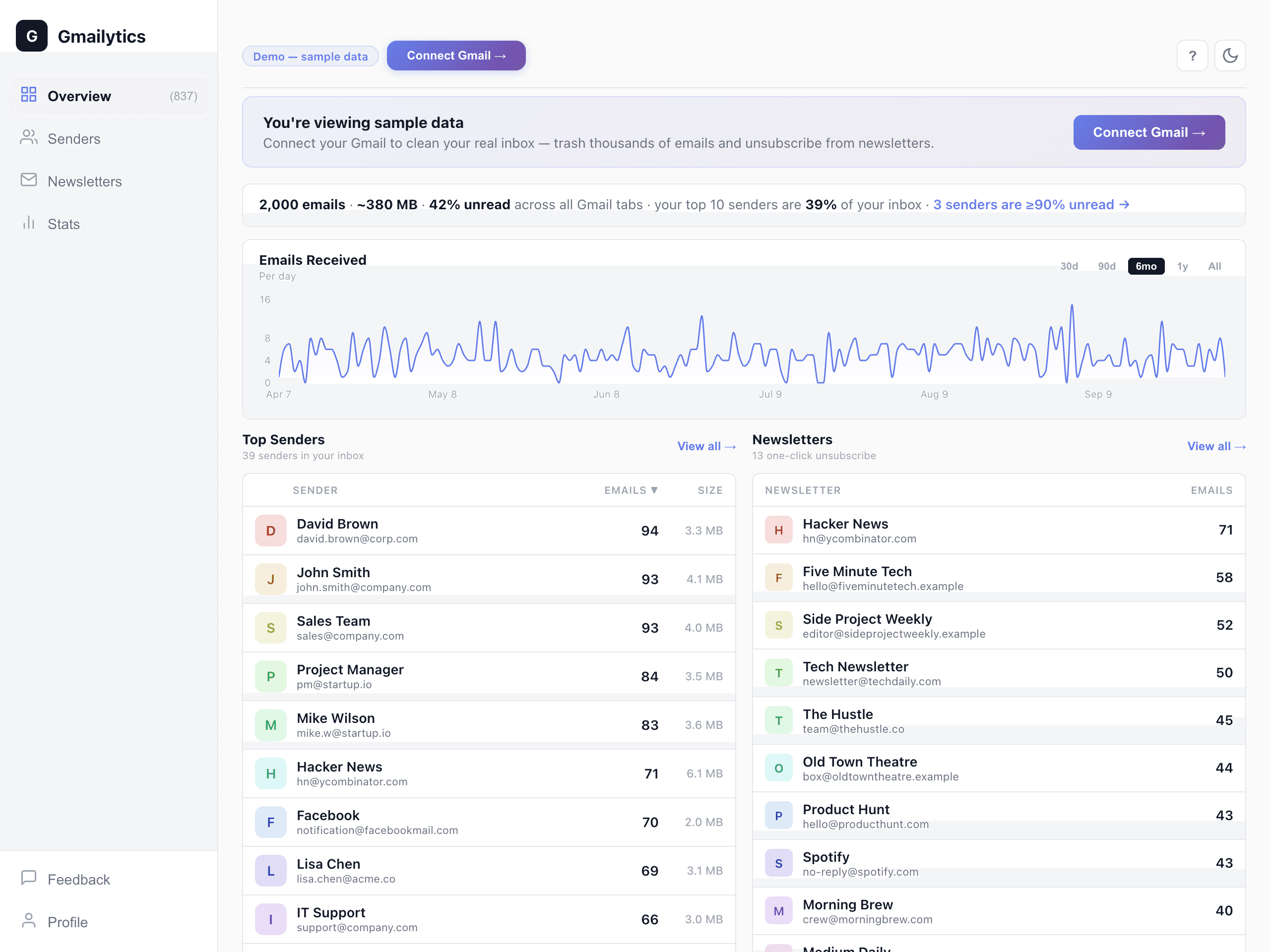
Gmail storage almost full? Before you pay for more, see which senders fill your inbox.
Find the senders behind the mess
Gmail can unsubscribe you from a sender. It doesn't clear the years of mail that sender already left in your inbox — Gmailytics does, sender by sender.
One-Click Cleanup
Select any sender and trash all their emails at once. Clean up hundreds of emails per sender with a single click. How to delete thousands at once →
Free Up Storage
See which senders take up the most space in your inbox — sort by size, or check Stats for your biggest storage hogs. Trash them in bulk, then empty Gmail's Trash to get the space back sooner. How to find your largest emails →
Your inbox at a glance
Once the scan finishes, one line sizes up your inbox: how many emails, roughly how much space, how much is unread, and how much of it comes from your top 10 senders.
Newsletter Unsubscribe
See all your newsletters in one place. Unsubscribe in one click where the sender supports it, or trash their emails in bulk.
Gmailytics works on your inbox — archived mail isn't scanned or cleaned. Trashed mail stays recoverable for 30 days and keeps counting toward your Google storage until Gmail empties the Trash, unless you empty it yourself sooner.
How Gmailytics works
Connect your Gmail and see who fills your inbox in minutes. We only access email metadata — never your email content.
Connect Gmail
Sign in with Google. The Gmail permission is what lets us trash and archive for you — we read only email metadata, never content.
See Top Senders
See who emails you most and how much space each sender takes up — plus a one-line summary of your inbox once the scan finishes.
Clean Up in Minutes
Select senders, batch trash thousands of emails at once, unsubscribe from newsletters, and free up Google storage.
Big inbox? The first scan of 50,000+ emails can take a while. You can start clearing the senders it has already found while it runs.
What users are saying
Rated 5.0 stars on the Chrome Web Store
“This tool quickly sorted my inbox into categories and helped me delete thousands of unnecessary emails without going one by one. A solid, time-saving tool for anyone overwhelmed by email clutter.”
Davita Moses
“Easy to use and helped to make noticeable progress quickly, cleaning through thousands of emails. Overall, a practical and time-saving essential Gmail cleanup tool.”
FaithWorld Tech
“Excellent, I just cleaned more than 8000 emails in a few seconds. Awesome!”
Abhishek Dayal
Skip the wait — get the extension
One click opens your dashboard, kept in sync in the background so it usually loads in seconds — no re-scan. Free, and it lives in your browser toolbar.
 Add to Chrome — Free
Also for your browser
 Edge
Edge Firefox
How Gmailytics compares
Considering other Gmail cleanup tools? See head-to-head breakdowns on pricing, free tier, and features.
Or see all 9 tools ranked: Best Gmail Cleanup Tools in 2026 →
Frequently asked questions
Is Gmailytics free?
Yes — 2,000 email cleanups a month plus unlimited newsletter unsubscribes, free forever. Need more? Gmailytics Pro is $7/quarter or $24/year for unlimited cleanups — cancel anytime.
Can Gmailytics read my emails?
No. Gmailytics only accesses email metadata (sender, date, size, labels, read status). We never read subject lines or your email content.
How do I clean up my inbox?
Gmailytics scans your inbox and ranks senders by email count and storage used. Select the senders you want to clean up, then batch trash or archive all their emails at once. You can also unsubscribe from newsletters directly.
What does Gmailytics show you?
Every sender in your inbox, ranked by email count and by storage used, with the share of each sender's email that's unread and the biggest storage hogs flagged; a “Mostly unread” filter for senders with at least 10 emails, 90% or more of them unread; a one-line summary once the scan finishes (total emails, approximate size, % unread and your top 10 senders' share); daily email volume; and your newsletters, with one-click unsubscribe where the sender supports it. It covers your inbox only — archived mail isn't scanned.
Ready to clean up your inbox?
Connect Gmail and see who's flooding your inbox in minutes.
Clean Up My Inbox →